Skip to content

googlemailguide.com

Gmail Email : Get started ! – Google Mail

  • Home
  • About Us
  • Contact Us
  • Privacy Policy
  • Terms

Tag: password

Sign in to Gmail – Gmail Android App

November 5, 2026 admin0 comment

If your Android already has Gmail app, login will be quick and easy.

STEP 1: Tap the “Gmail” icon to launch Gmail.
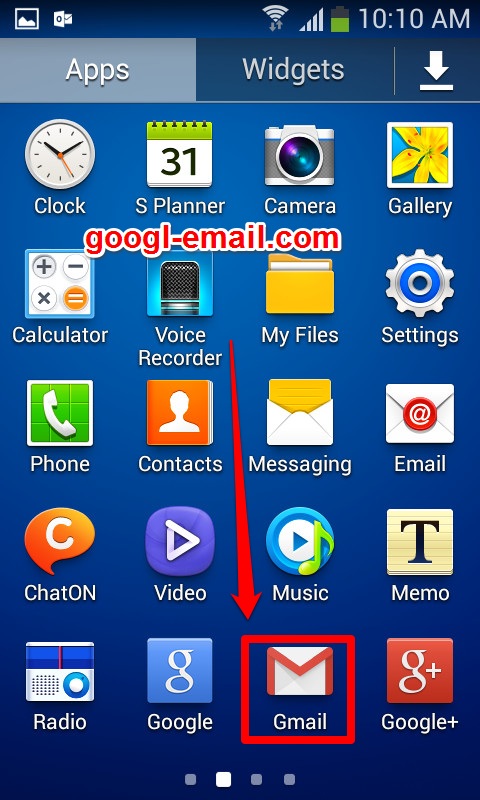
    • If the Google account associated with your Android is the one used for Gmail, you could launch the app and reach your inbox without any further actions.
    • To add a Gmail address that isn’t yet on your phone, apply the similar procedure.

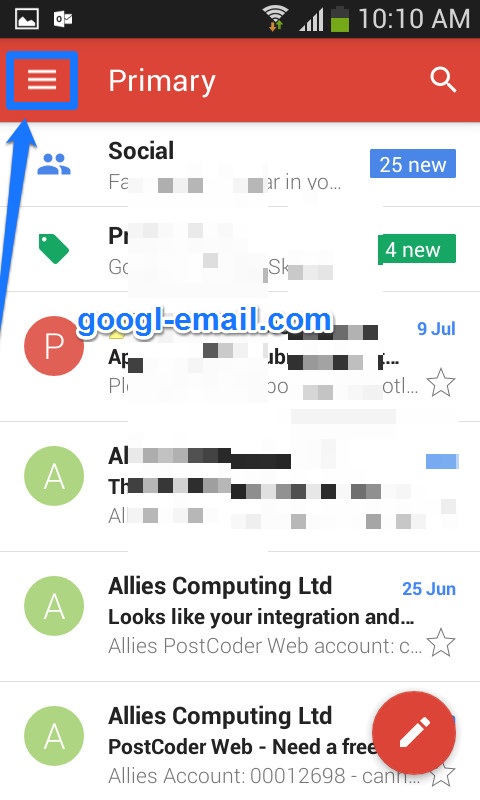
STEP 2: Open the ≡ menu, then select “Settings”.
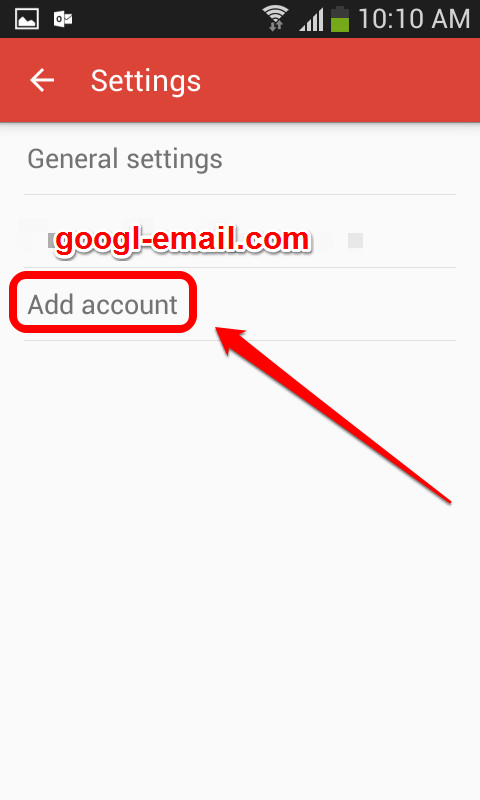
STEP 3: Tap “Add Account”. The “Set up email” screen will appear.
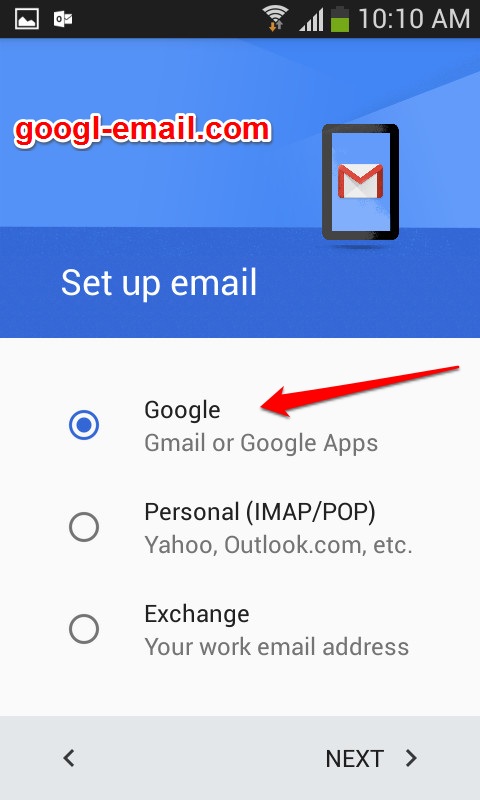
STEP 4 :  Select “Google” and then tap “Next”.
STEP 5: Enter your gmail username,password and then tap “Next”.

You’ll notice a “Forgot password” link right under the password blank. If you don’t remember your password, tap that link and follow its prompts.


Google Mail, Sign in to GmailGmail app, gmail username, password, Sign in to Gmail

Change Your Gmail Account Password, Quick and Easy

October 1, 2026November 21, 2026 admin0 comment

Regarding security and passwords, if you made those personal security data simple and easy to be tackled , you doubt  that someone has been snooping around your stuff (something as important as your mail); it is best to reset your privacy safeguarding before it is too late. Keep in mind that your mails are currently managed by many devices, including your smartphone and other ones, and they are also stored on webpage.

Therefore, it is critical to safeguard your email privacy and security from any potential risks, so we help you change your password Gmail whenever there are suspicious actions.

Gmail password change

If you wonder how I can change the password to my Gmail?, we are here to support you with few steps below.

Firstly, enter to your Gmail account:

  1. Click Settings and then click Account and Import
  2. Now select Change Settings Account
  3. And select the option Change Password

Next, you will be required to provide current password and then enter your new password before giving a confirmation of this course. Finally click “Change Password”.

Ready! With these simple steps, you could change your password for your Gmail account.

Google Mailchange, gmail account, google mail guide, password, security

Top Posts & Pages

  • Gmail Sign In
  • Gmail Sign Up
  • About Us

Archives

  • November 2026
  • October 2026
  • September 2026
  • February 2026

Categories

  • Gmail Account Management
  • Gmail Inbox
  • Google Contacts
  • Google Mail
  • Sign in to Gmail

Subscribe to Blog via Email

Enter your email address to subscribe to this blog and receive notifications of new posts by email.

Join 1 other subscriber

Blog Stats

  • 1,099 hits
  • Home
  • About Us
  • Contact Us
  • Privacy Policy
  • Terms
Copyright © All Rights Reserved. This is not an official site, we are only helping with our tutorials to access mail servers. We are not affiliated with or sponsored by Google Inc.
Powered by WordPress | Blue Planet by Nilambar
Go to top